

Exercise 1: Western
Information Architecture (IA)
What is included in the app?
The MyWestern app is essentially the mobile version of the WSU website. It provides all students access to university resources and the latest information they may need daily. This includes the WSU Library, Shuttle Timetable, 24 hour support and many more, the MyWestern app has got the WSU students covered.
List the tools/modules in order. How do you think they are clustered/organised?
- Maps
- Directory
- Events
- Emergency
- MyIT
- Students
- Library
- Shuttle
- Giving
- Wellbeing
- Careers
- Gradlife
- Videos
- News
- Residences
- Books
- Food
- Social
- Summer
- Clubs
- Sport
In my opinion, the modules are organized in a way that is easy and convenient for the students. The top links provides easy navigation, giving students quick access to sections containing the most used links. I would suggest not changing the elements within the application at this moment as it is easily navigable and is well suited towards Western Sydney University’s branding.
MyWestern App Site Flow

User Interface (UI)
Is the app easy to use? Can you navigate easily? Do you have suggestions for changes?
I personally find the MyWestern App incredibly easy to use, the app is straightforward and student friendly, the layout is kept simple which allows the application to be easily navigable and everything looks to be in the right place. The app provides everything the WSU student needs and is incredibly convenient to use on the go.
Visual Design
How do you describe the visual Design? Does it match the university’s brand image? What improvements could be made?
The visual design in the MyWestern app suits WSU’s image very well, the use of images and colours are very consistent to the WSU branding. The layout is simple, modern and clean, and the typefaces are legible giving the students an easy and satisfying user experience. I personally have no recommendations for visual improvements.
Visual Design Remake Activity
Original Home Screen

Re-Design
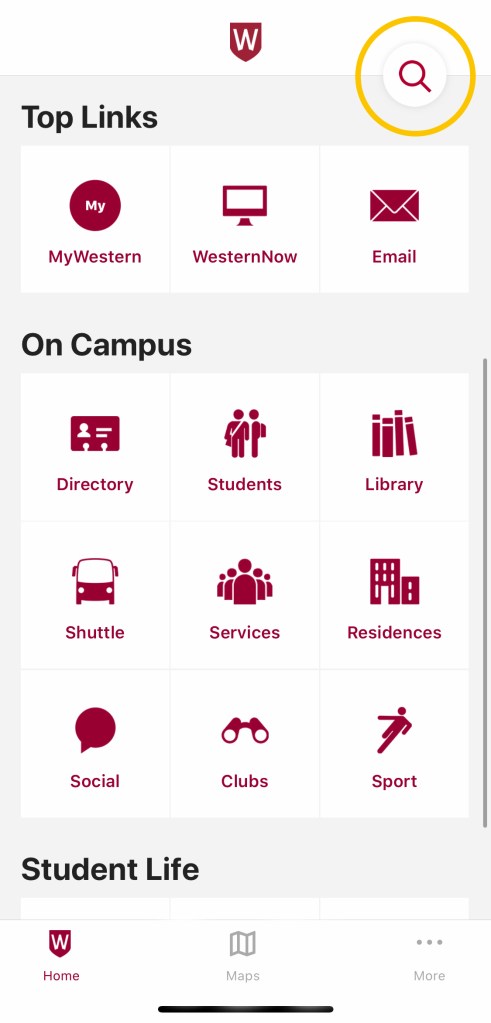
As seen above is the original home screen of the MyWestern app as well as my Re-Design of the layout. I had removed the search tab from the bottom bar and replaced it on the top where it is universally known to be found and easy to use.


